// tl-class.jsx — Class detail view
const { useState: useStateClass, useEffect: useEffectClass } = React;

function ClassDetail({ go }) {
  const [barShow, setBarShow] = useStateClass(false);
  useEffectClass(() => {
    const onScroll = () => {
      const y = window.scrollY;
      const nearBottom = window.innerHeight + y > document.body.scrollHeight - 220;
      setBarShow(y > 420 && !nearBottom);
    };
    onScroll();
    window.addEventListener("scroll", onScroll, { passive: true });
    return () => window.removeEventListener("scroll", onScroll);
  }, []);
  const facts = [
    { icon: "won",   k: "비용", v: CLASS.priceLabel, s: "중식(점심) 제공" },
    { icon: "cal",   k: "일시", v: CLASS.day, s: CLASS.time },
    { icon: "users", k: "인원", v: CLASS.capacity, s: "원장 1:1 밀착 지도" },
    { icon: "pin",   k: "장소", v: CLASS.place, s: CONTACT.address },
  ];
  return (
    <main>
      {/* CLASS HERO */}
      <section className="tl-wrap" style={{ paddingTop: 52, paddingBottom: 48 }}>
        <Kicker>{CLASS.kicker}</Kicker>
        <div className="tl-class-head">
          <h1 style={{ fontFamily: "var(--display)", fontWeight: 800, fontSize: "clamp(34px,4.8vw,60px)", letterSpacing: "-0.035em", lineHeight: 1.1, marginTop: 18, color: "var(--ink)" }}>
            {CLASS.name}
          </h1>
          <p style={{ fontSize: "clamp(16px,1.5vw,18.5px)", lineHeight: 1.75, color: "var(--muted)", maxWidth: 520, marginTop: 18 }}>{CLASS.lede}</p>
        </div>
        <div style={{ marginTop: 28 }}>
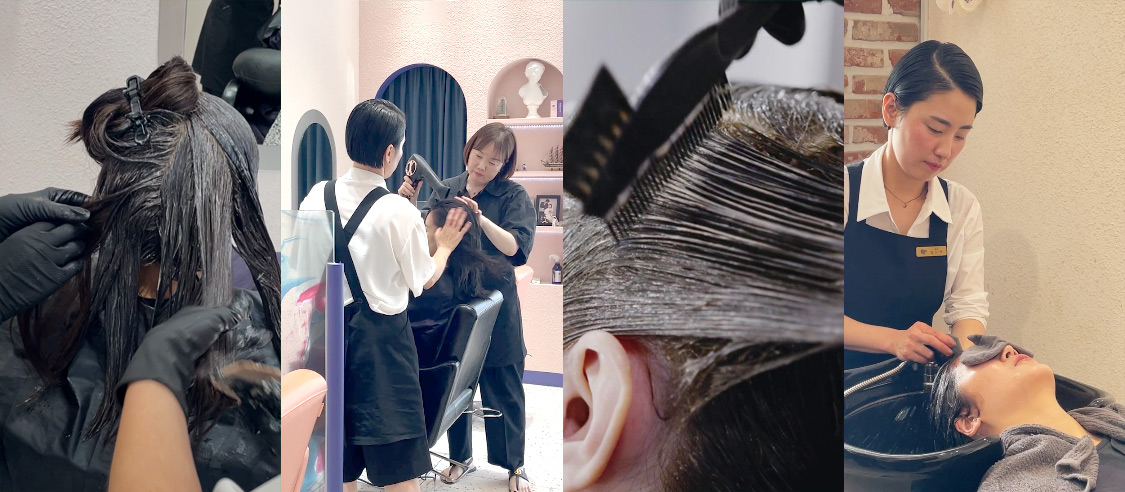
          <img src="uploads/main002.jpg" alt="틴트라이프 원데이클래스 현장 — 시술 실습 장면" style={{ display: "block", width: "100%", aspectRatio: "16 / 7", objectFit: "cover", borderRadius: 24 }} />
        </div>
      </section>

      {/* FACTS */}
      <section className="tl-wrap" style={{ paddingBottom: 24 }}>
        <div className="tl-facts">
          {facts.map((f) => (
            <div key={f.k} className="tl-fact">
              <span style={{ color: "var(--accent-ink)" }}><Icon name={f.icon} size={22} /></span>
              <div style={{ fontFamily: "var(--mono)", fontSize: 11, letterSpacing: "0.1em", textTransform: "uppercase", color: "var(--muted)", marginTop: 14 }}>{f.k}</div>
              <div style={{ fontSize: 19, fontWeight: 800, color: "var(--ink)", marginTop: 6, letterSpacing: "-0.02em", lineHeight: 1.25 }}>{f.v}</div>
              <div style={{ fontSize: 13, color: "var(--muted)", marginTop: 6, lineHeight: 1.5 }}>{f.s}</div>
            </div>
          ))}
        </div>
      </section>

      {/* CURRICULUM */}
      <section className="tl-wrap" style={{ paddingTop: 64, paddingBottom: 72 }}>
        <div style={{ maxWidth: 600, marginBottom: 40 }}>
          <Kicker>CURRICULUM</Kicker>
          <h2 className="tl-h2">수요일 하루, 배우게 될 것들</h2>
          <p className="tl-lead">처음 오신 분도 원장이 1:1로. 이론부터 실제 모델 시술, 운영 노하우까지 하루에 담았습니다.</p>
        </div>
        <div style={{ display: "grid", gap: 14 }}>
          {CURRICULUM.map((s, i) => (
            <article key={s.step} className="tl-step">
              <div className="tl-step-num">{s.step}</div>
              <div className="tl-step-body">
                <h3 style={{ fontSize: 19, fontWeight: 700, color: "var(--ink)", letterSpacing: "-0.02em" }}>{s.title}</h3>
                <p style={{ fontSize: 15, lineHeight: 1.7, color: "var(--muted)", marginTop: 8 }}>{s.desc}</p>
              </div>
              <div className="tl-step-tag">{s.tag}</div>
            </article>
          ))}
        </div>
      </section>

      {/* INCLUDED */}
      <section style={{ background: "var(--surface-2)", borderTop: "1px solid var(--hairline)", borderBottom: "1px solid var(--hairline)" }}>
        <div className="tl-wrap" style={{ paddingTop: 64, paddingBottom: 64 }}>
          <div className="tl-incl-head">
            <div>
              <Kicker>INCLUDED</Kicker>
              <h2 className="tl-h2">이 모든 게 무료로 제공됩니다</h2>
              <p className="tl-lead" style={{ maxWidth: 380 }}>참가비도, 준비물도 없이. 몸만 오시면 됩니다.</p>
            </div>
            <ul style={{ listStyle: "none", padding: 0, margin: 0 }} className="tl-incl-grid">
              {INCLUDED.map((it) => (
                <li key={it.label} style={{ display: "flex", alignItems: "center", gap: 14, padding: "14px 0", borderBottom: "1px solid var(--hairline)" }}>
                  <span style={{ flex: "none", width: 42, height: 42, borderRadius: 12, background: "var(--surface)", border: "1px solid var(--hairline)", display: "grid", placeItems: "center", color: "var(--accent-ink)" }}><Icon name={it.icon} size={20} /></span>
                  <span style={{ fontSize: 16, fontWeight: 600, color: "var(--ink)" }}>{it.label}</span>
                </li>
              ))}
            </ul>
          </div>
        </div>
      </section>

      {/* FAQ */}
      <section className="tl-wrap" style={{ paddingTop: 72, paddingBottom: 80 }}>
        <div className="tl-faq-wrap">
          <div className="tl-faq-side">
            <Kicker>FAQ</Kicker>
            <h2 className="tl-h2">자주 묻는 질문</h2>
            <p className="tl-lead" style={{ maxWidth: 320 }}>더 궁금한 점은 전화나 문의 폼으로 편하게 물어보세요.</p>
            <div style={{ marginTop: 22 }}>
              <Button variant="soft" onClick={() => go("reserve")} iconRight>문의하기</Button>
            </div>
          </div>
          <div style={{ flex: 1 }}>
            <Faq items={FAQS} />
          </div>
        </div>
      </section>

      <CtaBand go={go} />

      {/* STICKY APPLY BAR */}
      <div className={"tl-stickybar" + (barShow ? " show" : "")}>
        <div className="tl-wrap" style={{ display: "flex", alignItems: "center", justifyContent: "space-between", gap: 16, paddingTop: 12, paddingBottom: 12 }}>
          <div style={{ display: "flex", alignItems: "baseline", gap: 12, minWidth: 0 }}>
            <span style={{ fontSize: 19, fontWeight: 800, color: "var(--accent-ink)", letterSpacing: "-0.02em", whiteSpace: "nowrap" }}>비용 {CLASS.priceLabel}</span>
            <span className="tl-sticky-sub" style={{ fontSize: 13.5, color: "var(--muted)", whiteSpace: "nowrap", overflow: "hidden", textOverflow: "ellipsis" }}>{CLASS.day} {CLASS.time} · {CLASS.capacity}</span>
          </div>
          <Button onClick={() => go("reserve")} iconRight>무료 클래스 신청</Button>
        </div>
      </div>
    </main>
  );
}

// ---- FAQ accordion ----
function Faq({ items }) {
  const [open, setOpen] = useStateClass(0);
  return (
    <div style={{ borderTop: "1px solid var(--hairline)" }}>
      {items.map((f, i) => {
        const isOpen = open === i;
        return (
          <div key={i} style={{ borderBottom: "1px solid var(--hairline)" }}>
            <button onClick={() => setOpen(isOpen ? -1 : i)} style={{
              width: "100%", display: "flex", alignItems: "center", justifyContent: "space-between", gap: 16,
              background: "none", border: "none", cursor: "pointer", padding: "22px 4px", textAlign: "left",
            }}>
              <span style={{ fontSize: 16.5, fontWeight: 700, color: "var(--ink)", letterSpacing: "-0.01em" }}>{f.q}</span>
              <span style={{ flex: "none", width: 30, height: 30, borderRadius: 999, background: isOpen ? "var(--accent)" : "var(--surface-2)", color: isOpen ? "#fff" : "var(--ink)", display: "grid", placeItems: "center", transition: "all .2s", border: "1px solid var(--hairline)" }}>
                <Icon name={isOpen ? "minus" : "plus"} size={18} />
              </span>
            </button>
            <div style={{ maxHeight: isOpen ? 240 : 0, overflow: "hidden", transition: "max-height .3s ease" }}>
              <p style={{ fontSize: 15, lineHeight: 1.75, color: "var(--muted)", padding: "0 4px 24px", margin: 0, maxWidth: 600 }}>{f.a}</p>
            </div>
          </div>
        );
      })}
    </div>
  );
}

Object.assign(window, { ClassDetail, Faq });